


Zendesk connector
API KEY Customer SupportCommunicationConnect to Zendesk. Manage customer support tickets, users, organizations, and help desk operations
Zendesk connector
-
Install the SDK
Section titled “Install the SDK”Terminal window npm install @scalekit-sdk/nodeTerminal window pip install scalekit -
Set your credentials
Section titled “Set your credentials”Add your Scalekit credentials to your
.envfile. Find values in app.scalekit.com > Developers > API Credentials..env SCALEKIT_ENVIRONMENT_URL=<your-environment-url>SCALEKIT_CLIENT_ID=<your-client-id>SCALEKIT_CLIENT_SECRET=<your-client-secret> -
Set up the connector
Section titled “Set up the connector”Register your Zendesk credentials with Scalekit so it can authenticate requests on your behalf. You do this once per environment.
Dashboard setup steps
Register your Zendesk API credentials with Scalekit so it can authenticate requests on your behalf. You’ll need your Zendesk subdomain, email address, and an API token from your Zendesk Admin Center.
-
Generate an API token
-
In your Zendesk Admin Center, go to Apps and integrations → APIs → Zendesk API.
-
Under Settings, enable Token access.

-
Click Add API token, enter a description, and click Create.
-
Copy the token — it is only shown once.
-
-
Create a connection
In Scalekit dashboard, go to AgentKit > Connections > Create Connection. Find Zendesk and click Create.
-
Create a connected account
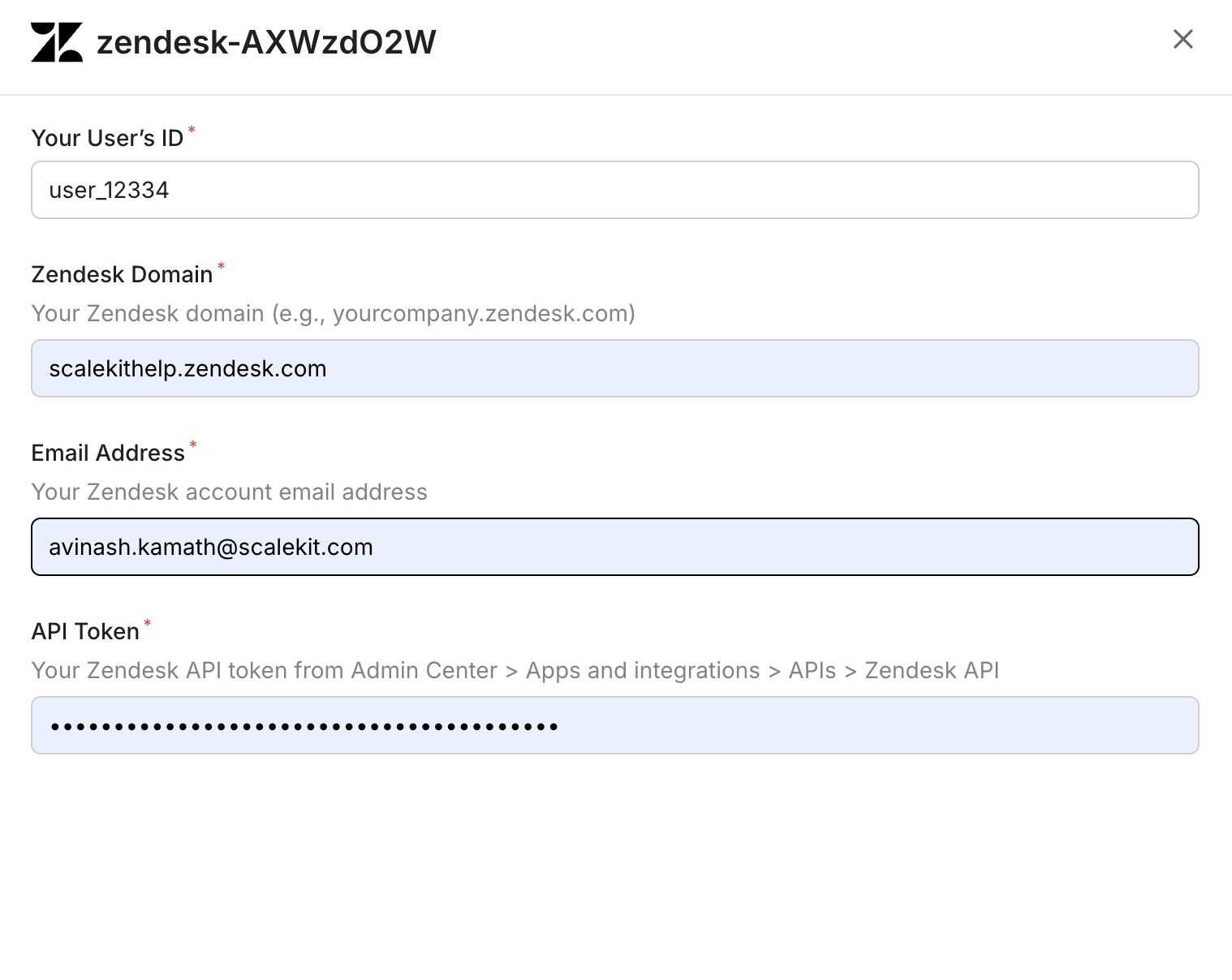
Go to Connected Accounts for your Zendesk connection and click Add account. Fill in the required fields:
-
Your User’s ID — a unique identifier for the user in your system
-
Zendesk Domain — your full Zendesk domain (e.g.,
yourcompany.zendesk.com) -
Email Address — the Zendesk account email address
-
API Token — the token you copied in step 1
-
Click Save.
-
-
What you can do
Section titled “What you can do”Connect this agent connector to let your agent:
- List help center sections, help center categories, help center articles — List all Help Center sections
- Get help center section, help center category, help center article — Retrieve a single Help Center section by its ID
- Search help center articles, tickets — Search Help Center articles by keyword
- Update help center article, ticket — Update article-level metadata: promoted status, position, comments setting, labels, and content tags
- Create help center article, help center article comment, user — Create a new Help Center article in a section
- Archive help center article — Archive (delete) a Help Center article by ID
Common workflows
Section titled “Common workflows”Proxy API call
Don’t worry about your Zendesk domain in the path. Scalekit automatically resolves {{domain}} from the connected account’s configuration. For example, a request with path="/v2/users/me" will be sent to https://mycompany.zendesk.com/api/v2/users/me automatically.
const result = await actions.request({ connectionName: 'zendesk', identifier: 'user_123', path: '/v2/users/me', method: 'GET',});console.log(result);result = actions.request( connection_name='zendesk', identifier='user_123', path="/v2/users/me", method="GET")print(result)Execute a tool
const result = await actions.executeTool({ connector: 'zendesk', identifier: 'user_123', toolName: 'zendesk_groups_list', toolInput: {},});console.log(result);result = actions.execute_tool( tool_input={}, tool_name='zendesk_groups_list', connection_name='zendesk', identifier='user_123',)print(result)Tool list
Section titled “Tool list”Use the exact tool names from the Tool list below when you call execute_tool. If you’re not sure which name to use, list the tools available for the current user first.
zendesk_groups_list
#
List all groups in Zendesk. Groups are used to organize agents and route tickets. 2 params
List all groups in Zendesk. Groups are used to organize agents and route tickets.
page number optional Page number for pagination per_page number optional Number of groups per page (max 100) zendesk_help_center_article_archive
#
Archive (delete) a Help Center article by ID. The article can be restored from the Zendesk Help Center UI. 1 param
Archive (delete) a Help Center article by ID. The article can be restored from the Zendesk Help Center UI.
article_id number required The ID of the article to archive. zendesk_help_center_article_comment_create
#
Add a comment to a Help Center article. Requires article ID, comment body, and locale. 5 params
Add a comment to a Help Center article. Requires article ID, comment body, and locale.
article_id number required The ID of the article to comment on. body string required HTML body of the comment. locale string required Locale for the comment (e.g., en-us). author_id number optional User ID of the comment author (Help Center managers only). notify_subscribers boolean optional Whether to notify article subscribers of the new comment. Default: true. zendesk_help_center_article_comments_list
#
List all comments on a Help Center article. 5 params
List all comments on a Help Center article.
article_id number required The ID of the article whose comments to list. include string optional Comma-separated sideloads: users (authors), articles. page integer optional Page number for offset pagination. per_page integer optional Number of results per page (max 100). sort_order string optional Sort direction: asc or desc. Default: desc. zendesk_help_center_article_create
#
Create a new Help Center article in a section. Requires a title, locale, and section ID. 12 params
Create a new Help Center article in a section. Requires a title, locale, and section ID.
locale string required Locale for the article (e.g., en-us). section_id number required The ID of the section to create the article in. title string required The title of the article. author_id number optional User ID of the article author. body string optional HTML body content of the article. comments_disabled boolean optional Whether to disable comments on this article. content_tag_ids array optional IDs of existing content tags to attach to the article. draft boolean optional If true, the article is saved as a draft and not published. notify_subscribers boolean optional Set to false to suppress email notifications to article subscribers on creation. Default: true. permission_group_id number optional The permission group that determines who can view this article. promoted boolean optional Whether to pin this article to the top of its section. user_segment_id number optional The user segment that can view this article. Omit for a public article. zendesk_help_center_article_get
#
Retrieve a single Help Center article by its ID. 2 params
Retrieve a single Help Center article by its ID.
article_id number required The ID of the article to retrieve. include string optional Comma-separated sideloads: users, sections, categories, translations. zendesk_help_center_article_update
#
Update article-level metadata: promoted status, position, comments setting, labels, and content tags. Does not update title or body — use the Translations API for those. 6 params
Update article-level metadata: promoted status, position, comments setting, labels, and content tags. Does not update title or body — use the Translations API for those.
article_id number required The ID of the article to update. comments_disabled boolean optional Whether to disable comments on this article. content_tag_ids array optional IDs of content tags to attach to the article. label_names array optional Labels to assign to the article. position integer optional Position of the article within its section. promoted boolean optional Whether to pin this article to the top of its section. zendesk_help_center_articles_list
#
List Help Center articles. Filter by section or category, sort, and paginate results. 7 params
List Help Center articles. Filter by section or category, sort, and paginate results.
include string optional Comma-separated sideloads: users, sections, categories, translations. label_names string optional Comma-separated list of labels to filter articles by. page integer optional Page number for offset pagination. per_page integer optional Number of results per page (max 100). sort_by string optional Field to sort by: position, title, created_at, updated_at, or edited_at. sort_order string optional Sort direction: asc or desc. start_time integer optional Unix epoch timestamp to fetch only articles updated after this time (for incremental sync). zendesk_help_center_articles_search
#
Search Help Center articles by keyword. Filter by category, section, locale, labels, and date range. 17 params
Search Help Center articles by keyword. Filter by category, section, locale, labels, and date range.
brand_id integer optional Scope the search to a specific brand ID. category number optional Filter results to a specific category ID. created_after string optional Limit results to articles created after this date (YYYY-MM-DD). created_at string optional Limit results to articles created on this date (YYYY-MM-DD). created_before string optional Limit results to articles created before this date (YYYY-MM-DD). label_names string optional Comma-separated list of labels to filter by. locale string optional Filter results to a specific locale. multibrand boolean optional Search across all brands when true. Defaults to false. page integer optional Page number for offset pagination. per_page integer optional Number of results per page (max 100). query string optional Full-text search query. section number optional Filter results to a specific section ID. sort_by string optional Sort by relevance, created_at, or updated_at. sort_order string optional Sort direction: asc or desc. updated_after string optional Limit results to articles updated after this date (YYYY-MM-DD). updated_at string optional Limit results to articles updated on this date (YYYY-MM-DD). updated_before string optional Limit results to articles updated before this date (YYYY-MM-DD). zendesk_help_center_categories_list
#
List all Help Center categories in your Zendesk account. Returns categories with IDs, names, and positions. 5 params
List all Help Center categories in your Zendesk account. Returns categories with IDs, names, and positions.
include string optional Sideload related data. Use 'translations' to include category translations. page integer optional Page number for offset pagination. per_page integer optional Number of results per page (max 100). sort_by string optional Field to sort by: position, created_at, or updated_at. sort_order string optional Sort direction: asc or desc. zendesk_help_center_category_get
#
Retrieve a single Help Center category by its ID. 2 params
Retrieve a single Help Center category by its ID.
category_id number required The ID of the category to retrieve. include string optional Sideload related data. Use 'translations' to include category translations. zendesk_help_center_section_get
#
Retrieve a single Help Center section by its ID. 2 params
Retrieve a single Help Center section by its ID.
section_id number required The ID of the section to retrieve. include string optional Comma-separated sideloads: 'categories' to include the parent category, 'translations' to include translations. zendesk_help_center_sections_list
#
List all Help Center sections. Filter by category to narrow results. 5 params
List all Help Center sections. Filter by category to narrow results.
include string optional Comma-separated sideloads: 'categories' to include the parent category, 'translations' to include translations. page integer optional Page number for offset pagination. per_page integer optional Number of results per page (max 100). sort_by string optional Field to sort by: position, created_at, or updated_at. sort_order string optional Sort direction: asc or desc. zendesk_organization_get
#
Retrieve details of a specific Zendesk organization by ID. Returns organization name, domain names, tags, notes, shared ticket settings, and custom fields. 2 params
Retrieve details of a specific Zendesk organization by ID. Returns organization name, domain names, tags, notes, shared ticket settings, and custom fields.
organization_id number required The ID of the organization to retrieve include string optional Additional related data to include (e.g., lookup_relationship_fields) zendesk_organizations_list
#
List all organizations in Zendesk with pagination support. 2 params
List all organizations in Zendesk with pagination support.
page number optional Page number for pagination per_page number optional Number of organizations per page (max 100) zendesk_search_tickets
#
Search Zendesk tickets using a query string. Supports Zendesk's search syntax (e.g., 'type:ticket status:open'). Zendesk limits search results to 1,000 total — the maximum valid page is floor(1000 / per_page) (e.g., per_page=100 → max page 10, per_page=25 → max page 40). Stop paginating when next_page is null or you reach the max page; requesting beyond the limit returns a 400 error. 6 params
Search Zendesk tickets using a query string. Supports Zendesk's search syntax (e.g., 'type:ticket status:open'). Zendesk limits search results to 1,000 total — the maximum valid page is floor(1000 / per_page) (e.g., per_page=100 → max page 10, per_page=25 → max page 40). Stop paginating when next_page is null or you reach the max page; requesting beyond the limit returns a 400 error.
query string required Search query string using Zendesk search syntax (e.g., 'type:ticket status:open assignee:me') include string optional Comma-separated list of additional data to sideload with results. Supported values: users, groups, organizations, tickets. page number optional Page number for pagination. Max valid page = floor(1000 / per_page). Do not exceed this — Zendesk returns a 400 error beyond the 1,000 result limit. per_page number optional Number of results per page (max 100). Determines the max page ceiling: floor(1000 / per_page). Higher values mean fewer pages but a lower max page number. sort_by string optional Field to sort results by (updated_at, created_at, priority, status, ticket_type) sort_order string optional Sort direction: asc or desc (default: desc) zendesk_side_conversation_get
#
Retrieve a specific side conversation on a Zendesk ticket by its ID. Returns the side conversation's state, subject, participants, preview text, and timestamps. Requires the Collaboration add-on. 3 params
Retrieve a specific side conversation on a Zendesk ticket by its ID. Returns the side conversation's state, subject, participants, preview text, and timestamps. Requires the Collaboration add-on.
side_conversation_id string required The ID of the side conversation to retrieve ticket_id number required The ID of the parent ticket include string optional Sideloads to include alongside the response. Use 'side_conversation_events' to include the full event history of the side conversation. zendesk_side_conversations_list
#
List all side conversations on a Zendesk ticket. Returns side conversations including their state, subject, participants, and preview text. Requires the Collaboration add-on. 2 params
List all side conversations on a Zendesk ticket. Returns side conversations including their state, subject, participants, and preview text. Requires the Collaboration add-on.
ticket_id number required The ID of the ticket whose side conversations to list include string optional Sideloads to include alongside the response. Use 'side_conversation_events' to include the full event history for each side conversation. zendesk_ticket_comments_list
#
Retrieve all comments (public replies and internal notes) for a specific Zendesk ticket. Returns comment body, author, timestamps, and attachments. 4 params
Retrieve all comments (public replies and internal notes) for a specific Zendesk ticket. Returns comment body, author, timestamps, and attachments.
ticket_id number required The ID of the ticket whose comments to list include string optional Sideloads to include. Accepts 'users' to list email CCs. include_inline_images boolean optional When true, inline images are listed as attachments (default: false) sort_order string optional Sort direction for comments: asc or desc (default: asc) zendesk_ticket_create
#
Create a new support ticket in Zendesk. Requires a comment/description and optionally a subject, priority, assignee, and tags. 7 params
Create a new support ticket in Zendesk. Requires a comment/description and optionally a subject, priority, assignee, and tags.
comment_body string required The description or first comment of the ticket assignee_email string optional Email of the agent to assign the ticket to priority string optional Ticket priority: urgent, high, normal, or low status string optional Ticket status: new, open, pending, hold, solved, or closed subject string optional The subject/title of the ticket tags array optional List of tags to apply to the ticket type string optional Ticket type: problem, incident, question, or task zendesk_ticket_get
#
Retrieve details of a specific Zendesk ticket by ID. Returns ticket properties including status, priority, subject, requester, assignee, and timestamps. 2 params
Retrieve details of a specific Zendesk ticket by ID. Returns ticket properties including status, priority, subject, requester, assignee, and timestamps.
ticket_id number required The ID of the ticket to retrieve include string optional Comma-separated list of sideloads to include (e.g., users, groups, organizations) zendesk_ticket_reply
#
Add a public reply or internal note to a Zendesk ticket. Set public to false for internal notes visible only to agents. 3 params
Add a public reply or internal note to a Zendesk ticket. Set public to false for internal notes visible only to agents.
body string required The reply message content (plain text, markdown supported) ticket_id number required The ID of the ticket to reply to public boolean optional Whether the comment is public (true) or an internal note (false). Defaults to true. zendesk_ticket_update
#
Update an existing Zendesk ticket. Change status, priority, assignee, subject, tags, or any other writable ticket field. 9 params
Update an existing Zendesk ticket. Change status, priority, assignee, subject, tags, or any other writable ticket field.
ticket_id number required The ID of the ticket to update assignee_email string optional Email of the agent to assign the ticket to assignee_id number optional ID of the agent to assign the ticket to group_id number optional ID of the group to assign the ticket to priority string optional Ticket priority: urgent, high, normal, or low status string optional Ticket status: new, open, pending, hold, solved, or closed subject string optional New subject/title for the ticket tags array optional List of tags to set on the ticket (replaces existing tags) type string optional Ticket type: problem, incident, question, or task zendesk_tickets_list
#
List tickets in Zendesk with sorting and pagination. Returns tickets for the authenticated agent's account. 4 params
List tickets in Zendesk with sorting and pagination. Returns tickets for the authenticated agent's account.
page number optional Page number for pagination per_page number optional Number of tickets per page (max 100) sort_by string optional Field to sort by: created_at, updated_at, priority, status, ticket_type sort_order string optional Sort direction: asc or desc (default: desc) zendesk_user_create
#
Create a new user in Zendesk. Can create end-users (customers), agents, or admins. Email is required for end-users. 6 params
Create a new user in Zendesk. Can create end-users (customers), agents, or admins. Email is required for end-users.
name string required Full name of the user email string optional Primary email address of the user organization_id number optional ID of the organization to associate the user with phone string optional Primary phone number (E.164 format, e.g. +15551234567) role string optional User role: end-user, agent, or admin. Defaults to end-user. verified boolean optional Whether the user's identity is verified. Defaults to false. zendesk_user_get
#
Retrieve details of a specific Zendesk user by ID. Returns user profile including name, email, role, organization, and account status. 2 params
Retrieve details of a specific Zendesk user by ID. Returns user profile including name, email, role, organization, and account status.
user_id number required The ID of the user to retrieve include string optional Comma-separated list of sideloads to include zendesk_users_list
#
List users in Zendesk. Filter by role (end-user, agent, admin) with pagination support. 4 params
List users in Zendesk. Filter by role (end-user, agent, admin) with pagination support.
page number optional Page number for pagination per_page number optional Number of users per page (max 100) role string optional Filter by role: end-user, agent, or admin sort string optional Field to sort by. Prefix with - for descending (e.g. -created_at) zendesk_views_list
#
List ticket views in Zendesk. Views are saved filters for organizing tickets by status, assignee, tags, and more. 5 params
List ticket views in Zendesk. Views are saved filters for organizing tickets by status, assignee, tags, and more.
access string optional Filter by access level: personal, shared, or account page number optional Page number for pagination per_page number optional Number of views per page (max 100) sort_by string optional Field to sort by: title, updated_at, created_at, or position sort_order string optional Sort direction: asc or desc